How AITM merges finished work into dev, fixes post-merge test failures forward instead of reverting, and verifies a task only touched what it was supposed to.
Merging, Post-Merge Fixes & Scope Gate
How merging works
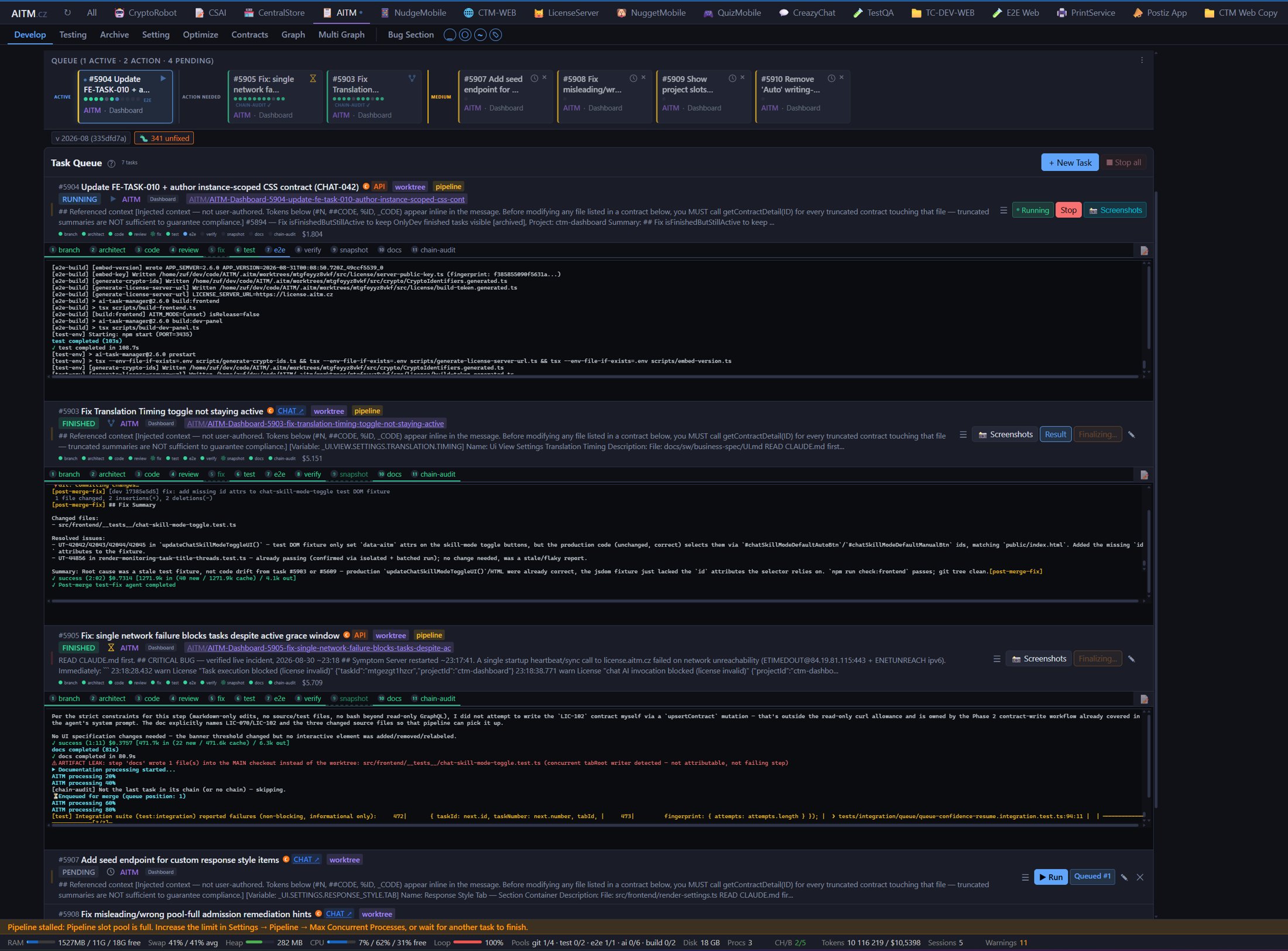
Every task runs in its own git branch/worktree. When the pipeline finishes (implementation,
review, tests all green), the task enters AITM's merge queue — a serialized
queue so concurrent tasks never merge into dev at the same time and stomp on each
other's changes.
- Automatic merge trigger. A task with
autoMergeDevenabled merges intodevautomatically once its pipeline finishes — no manual approval step, so finished work lands continuously instead of piling up waiting for a human to click merge. - Pre-merge build gate. The task's branch is first brought up to date with the current
dev, then built and type-checked as it will look after the merge. If the check is red, a fix agent gets a limited number of attempts; errors that already exist ondevare not blamed on the task. If the gate stays red, the task is not merged and ends inconflictwith the build output attached. - Conflict handling. If a task's branch conflicts with what has already landed in
dev, AITM retries the merge with different strategies and then hands the conflicting files to an AI conflict resolver, which combines both changes and re-runs the build gate. A task waiting inconflictis re-checked automatically; if the cause has disappeared in the meantime, it heals itself and continues to the merge. - Controlled merge into dev. Merges happen one at a time from the queue,
so
devis never in a half-merged state. Merging is not a pipeline step: the task showsfinishedwith a Finalizing… marker and becomesarchivedonce the merge lands. While a task stays inconflict, other queued tasks in the same tab wait behind it — so it is worth resolving soon.
dev.Post-merge error detection and fixing
Once a task's branch is merged into dev, AITM re-runs the affected tests
against the new state of dev. If they now fail, the default response is
not to revert the merge.
Example: a task adds a new field to a shared model. It merges cleanly and its own tests pass. But another task, already in flight on a different branch, depended on the old shape of that model — after both land, a shared integration test starts failing. Instead of reverting either merge (which would also throw away the unrelated, working half of each change), AITM:
- Isolates which files/tests are actually failing and which task's change is responsible.
- Fixes forward on a branch — a corrective task is created that targets
only the failing area, working from the current state of
dev(not from either original task's diff). - Re-tests the fix in isolation before it is allowed anywhere near
devagain. - Merges the fix through the same queue as any other task.
This "fix forward" philosophy avoids cascading damage: reverting a merge after other work has already built on top of it would force a chain of further reverts. Fixing the actual breakage in place, on its own branch, keeps the blast radius limited to the one problem that was found.
Task scope evaluation (Business Scope Gate)
Every task declares, up front, which files it plans to touch. When the task finishes, the Business Scope Gate compares the files it actually changed against that declaration.
- Out of scope means a changed file was never declared and has no plausible connection to the task's stated goal — for example, a task about the checkout page also editing an unrelated admin settings file.
- Scope amendments. Sometimes touching an undeclared file is legitimate — a shared type had to change, or a constant lives in a neighboring file. In that case the task records a short, explicit justification for the extra file (a "scope amendment") instead of silently going out of bounds. A justified amendment is accepted; an unexplained extra file is not.
- Blocking vs. advisory violations. Not every undeclared file is treated
the same way:
- Blocking — the changed file is genuinely foreign to the task (different feature area, no shared dependency, no justification given). This stops the merge until it is resolved.
- Advisory — the changed file lives in the same directory/module as the declared scope and is plausibly related (e.g. a sibling file in the same feature folder). This is flagged for review but does not block the merge by itself.
What becomes a bug vs. a new task
When a review step finds something beyond the immediate diff, AITM decides between two outcomes:
- Becomes a bug when the finding is a blocking scope violation, or a genuine defect that is unrelated to what the task was supposed to do — something that is already broken and needs its own fix cycle, independent of the current task's outcome.
- Becomes a new (follow-up) task when the finding is a refinement, a nice-to-have improvement, or a legitimate but out-of-scope idea surfaced while working on something else — it goes into the queue on its own terms rather than expanding the current task's scope.
This split keeps each task's diff focused on the thing it was asked to do, while still capturing everything a reviewer notices along the way — nothing observed during review is silently dropped, but it also isn't smuggled into an unrelated change.
When a task fails and requires human intervention
Not every failure is auto-recoverable. AITM's watchdog and self-heal mechanisms handle
infrastructure hiccups and routine compile/test failures on their own, but some errors are
terminal — they need a human decision, not another retry. A task ends in the
terminal failed state when:
- Configuration is wrong. Invalid API keys, incorrect settings, malformed JSON — nothing in the code can fix a broken environment.
- The AI is missing data. The task prompt is incomplete or ambiguous, required context wasn't supplied, or the requirements are underspecified.
- There is a fundamental blocker only a user can resolve. The architecture needs clarification, the scope is contested, or a third-party service is down in a way that needs explicit acknowledgment before work can continue.
Example: suppose a task fails because the requirements conflict with the existing architecture. AITM cannot guess which design is correct — a human has to clarify. At this point:
- The task is marked
failed. - You (and Claude) discuss the root cause in chat or brainstorm.
- You decide: requeue with clearer scope? File a separate architecture-design task first? Adjust the approach?
- Then create a new task with the refined understanding, or requeue with an updated prompt.
Not all failures are bugs — many are legitimately unsolvable without human input. Failed doesn't mean wasted work — the diagnostics and logs from a failed run still tell you exactly where things went wrong. And when a task fails, it's a conversation point between you and AITM, not a dead end.
Branch model
Every AITM-managed project follows the same two-branch release model.
devis the default / integration branch. Every pipeline task merges intodev— this is where finished, tested work lands continuously (see the merge queue above).mainis the stable release branch. It is updated only by adev→mainmerge at release time, not by individual tasks.- There is no
masterbranch. AITM never creates or expects one. - Imported projects can keep their own integration branch. If a project
you onboard already uses a different name for its integration branch, set it via the
Integration branch setting (
defaultBranch) in Project settings, and use the Verify remote check there to confirm it resolves against the actual git remote. - The bundled Gitea in the Docker release creates demo repositories with
devas their default branch, matching this same model out of the box.
If a task's project has no usable git remote, the task stops with an actionable message pointing you to Project settings → Verify remote instead of surfacing a raw git error.